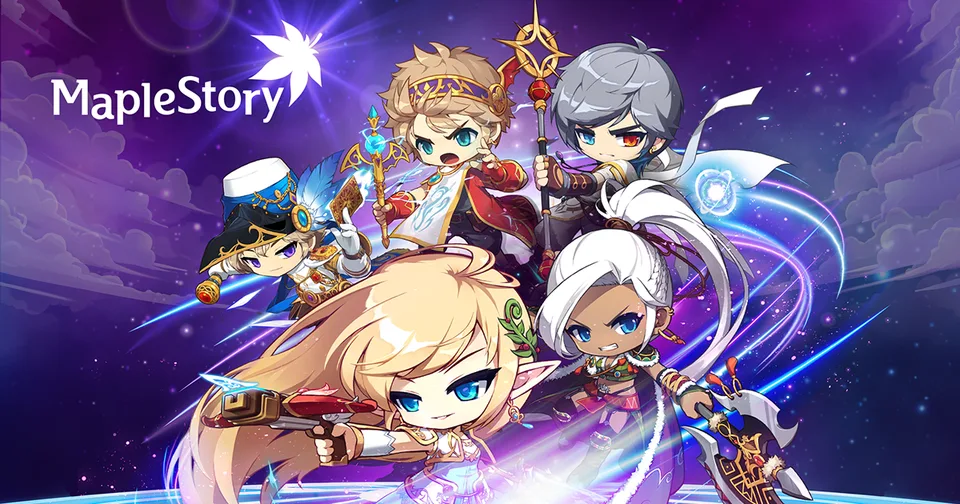
Best MapleStory Wallpaper Collections for Your Desktop 2026
Discover the best MapleStory wallpaper collections to customize your desktop. Get high-quality game art and level up your aesthetic with our expert guide.
Published: MapleStory Wiki Editorial Team
Table of Contents
The world of MapleStory is iconic for its vibrant, hand-drawn art style that has defined the MMORPG landscape for over two decades. If you are a dedicated fan looking to refresh your workspace, finding the perfect maplestory wallpaper can instantly transform your desktop into a portal to the Maple World.
Whether you are a veteran player who remembers the early days of Victoria Island or a newcomer fascinated by the latest 6th Job skills, your choice of background says a lot about your journey. This guide explores the best ways to source high-resolution imagery and how to select the right maplestory wallpaper to suit your aesthetic preferences.
Why Quality Matters for Your Desktop Background
A low-quality, pixelated image can ruin the professional look of your desktop setup. When searching for a maplestory wallpaper, the resolution and aspect ratio are the two most critical factors. Most modern monitors operate at 1080p, 1440p, or 4K resolutions, and using an image that doesn't match these standards will lead to blurriness or cropping issues.
Beyond resolution, official art is always preferred because it captures the intended color palette and character details designed by the NEXON artists. Utilizing community-driven platforms like Pinterest can be helpful, but they often compress files, whereas official repositories provide the crisp, clear visuals intended by the developers.
Comparison of Wallpaper Sourcing Methods
Method
Quality
Safety
Variety
Official Nexon Media Hub
High
Excellent
Curated/Official
Pinterest/Fan Sites
Variable
Moderate
High/Fan-made
Third-Party Wallpaper Apps
High
Variable
Dynamic/Animated
Where to Find Official MapleStory Artwork
The most reliable way to find a stunning maplestory wallpaper is through the official MapleStory Media Page. Nexon frequently updates this section with high-quality screenshots and promotional art from major game updates.
These assets are curated by the developers, meaning you don't have to worry about watermarks or fan-art distortions. From the "Ride the Lightning" update visuals to the elegant "Sia Astelle" character art, these images are optimized for display and provide a polished look that fan-edited content often lacks.
Browse through the available categories, such as screenshots or specific event banners.
Click on the image to view it in full size.
Right-click and choose "Save Image As" to store it locally on your machine.
Tip
Always check for the latest "MapleStory Fest" or anniversary-themed wallpapers. These are often released as limited-time high-resolution kits that celebrate the game’s history.
Styling Your Desktop: Themes and Layouts
Choosing a maplestory wallpaper is just the beginning of your customization journey. To make your desktop truly reflect your love for the game, consider how your icons and taskbar interact with the background colors.
If you prefer a clean look, try a minimalist character portrait against a solid, soft-colored background. If you enjoy the bustling energy of the game, a wide-angle shot of a major city like Henesys or Leafre provides a dynamic atmosphere that feels alive.
Common Desktop Setup Strategies
The Minimalist: Use a high-quality character icon or a simple logo on a neutral background.
The Immersive: Use a wide-angle landscape shot from a popular zone like the Temple of Time.
The Seasonal: Change your background every few months to match current in-game events or holiday celebrations.
Managing Your Wallpaper Collection
As you collect more images, keeping your files organized becomes essential. Many players find that creating a dedicated "Gaming Backgrounds" folder helps them rotate their maplestory wallpaper automatically using Windows or macOS built-in slideshow features.
If you are using a Windows PC, you can configure the "Personalization" settings to rotate through your favorite images at set intervals, such as every hour or every day. This keeps your desktop feeling fresh without requiring manual updates.
Recommended Rotation Settings
Setting
Benefit
Change picture every 1 hour
Keeps the desktop feeling dynamic
Shuffle order
Adds an element of surprise to your day
Fit: Fill/Stretch
Prevents black bars on different monitor sizes
Community-Driven Content vs. Official Art
While official sources are the safest bet, the community often creates unique content that you won't find anywhere else. According to various player experiences shared on forums, many fans enjoy creating "live" wallpapers using third-party software like Wallpaper Engine.
However, always exercise caution when downloading executable files or custom themes from third-party sites. Ensure you are downloading from reputable creators and scanning files for potential security risks. When in doubt, stick to the official media galleries provided by the publisher.
FAQ: Frequently Asked Questions
Q: Where can I find the highest quality maplestory wallpaper?
A: The most reliable source is the official MapleStory Media Hub on the Nexon website, which provides high-resolution, developer-approved artwork.
Q: Can I use fan-made maplestory wallpaper designs safely?
A: Yes, but be cautious. Only download from reputable community platforms and ensure your antivirus is active. Avoid clicking on suspicious links that promise "dynamic" content from unknown sources.
Q: How often should I change my desktop background?
A: That is entirely up to you! Many players change their wallpaper to match the current in-game event or seasonal update to keep their desktop experience aligned with their in-game progress.
Q: Are there animated maplestory wallpapers available?
A: While official sources primarily offer static images, many players use community-made tools to create animated versions. Always prioritize safety and official software when customizing your desktop environment.